Managed WordPress hosting · Pricing
Kinsta Promo Code 2026: There Is None – What You Actually Save
Kinsta has no code to type at checkout in 2026: on its pricing page (re-read 23 September 2026) both savings are part of the list price. Annual billing gives you 12 months for the price of 10 (two months free), and new customers currently get the first month free on select plans – on the entry plan you pay 0 USD today and 350 USD after the first month. The screenshot is below.
Affiliate link: Kinsta pays us a commission if you sign up through it. The price you pay is Kinsta’s list price and is the same either way.
 Written and checked by Sascha Martins, Promo Code Network, Switzerland
On this page
How Kinsta’s annual billing works
- Open Kinsta’s plan page Use the button above. The first-month-free offer is shown on the plan cards for new customers; nothing needs to be entered.
- Pick the plan by monthly visits Single 35k (one WordPress site, 35,000 visits, 10 GB) is the entry point. The WP 2 plan starts the multi-site tier at two installs. Overages are billed per additional 1,000 visits rather than by cutting the site off.
- Switch the billing toggle to annual This is where the saving is: 12 months for the price of 10. On Single 35k that is 350 USD a year instead of 420 USD paid monthly.
- Let Kinsta move the site Migrations are done by Kinsta’s team and are unlimited and free on every plan. Request them in MyKinsta after signup, with your current host’s details or a backup file, rather than moving the site yourself; details under Kinsta migration cost.
What the plan page showed when we checked
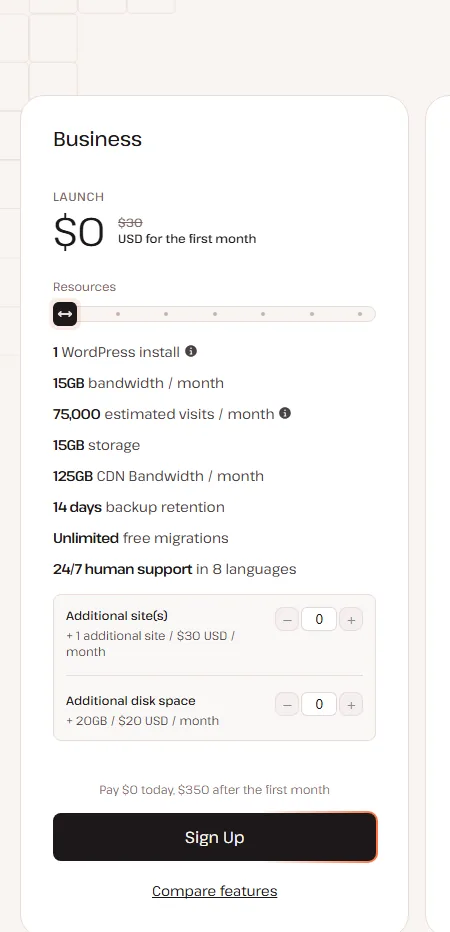
Kinsta pricing plans 2026: Single, WP and bandwidth plans explained
Kinsta’s plan page is split by number of sites and by what the plan is measured in, visits or bandwidth. The old names Starter, Pro and Business are gone: single-site plans are Single 35k, 65k and 125k, multi-site plans WP 2, 5 and 10. The tiers differ in capacity, not in what the hosting does.
| Plan | Sites | Monthly visits | Storage | Monthly billing | Annual billing | Per month on annual |
|---|---|---|---|---|---|---|
| Single 35k | 1 | 35,000 | 10 GB | 35 USD | 350 USD | 30 USD |
| Single 65k | 1 | 65,000 | 10 GB | 50 USD | 500 USD | 42 USD |
| Single 125k | 1 | 125,000 | 10 GB | 90 USD | 900 USD | 75 USD |
| WP 2 | 2 | 70,000 | 20 GB | 70 USD | 700 USD | 59 USD |
| WP 5 | 5 | 125,000 | 30 GB | 115 USD | 1,150 USD | 96 USD |
| WP 10 | 10 | 315,000 | 40 GB | 225 USD | 2,250 USD | 188 USD |
Kinsta’s USD list prices excluding tax, read 23 September 2026. The annual price is ten times the monthly price; the per-month figures on annual billing are rounded twelfths (350 divided by 12 is 29.17, shown as 30). Larger Single and WP tiers continue the same pattern up to Enterprise. On 22 September 2026 Kinsta’s pricing page also showed a second, simplified line-up to some visitors (Launch 30 USD, Launch Plus 50, Build 58, Expand 83, Scale 141, Lead 250 USD a month on annual billing; 1 to 20 sites, 75,000 to 1.5 million visits); the entry price, the annual discount and the first month free are identical, so compare the line-up you are shown, not the names.
Every plan includes unlimited free migrations by Kinsta’s team, free one-click staging, backups retained for 14 days, free SSL certificates and 24/7 chat support from the dashboard, which Kinsta’s pricing page lists in 8 languages. Plans can be changed at any time with prorated billing. Not included on any plan: mailboxes (transactional email from WordPress goes through a built-in relay; a mailbox needs a separate provider) and domain registration.
Two things distinguish Kinsta’s pricing from the shared hosts it is often compared with. Kinsta has no introductory rate that steps up later; its terms allow fee increases with reasonable prior notice. And every plan runs on the same platform, which Kinsta describes as isolated containers in 30 data centres with Cloudflare integration and a CDN with 300+ edge locations (kinsta.com/wordpress-hosting, 23 September 2026); the tiers differ by capacity. The shared plans it is set against start lower but renew higher: SiteGround StartUp at 5.3 to 6 times the intro price, depending on the storefront, and Hostinger Premium at 3.7 times.
Visits or bandwidth: the second toggle on the plan page
A visit is each unique IP address that reaches your site within 24 hours, counted across all sites on the account. The bandwidth-based alternative counts transferred data instead: Single 20GB costs the same as Single 35k, 35 USD monthly or 30 USD a month on annual billing, for one site, 20 GB of server bandwidth a month and 10 GB of storage, with the same first-month-free offer. Exceeding either measure does not take the site offline: Kinsta notifies you at 80% and 100% of usage and bills the overage afterwards, per additional 1,000 visits or per GB.
Add-ons and overages: what moves the monthly bill
| Add-on | List price | When it matters |
|---|---|---|
| Additional WordPress site | 30 USD a site a month | A second site on a Single plan; compare with WP 2 |
| Extra storage | 20 USD per 20 GB a month, shared across the account | Media-heavy sites that outgrow 10 GB |
| Backups every 6 hours / every hour | 20 / 100 USD a site a month | Shops and sites that change hourly; daily backups are included |
| Premium staging environment | 20 USD an environment a month, up to five a site | Resource-heavy testing; standard staging is included |
| Redis caching | 100 USD a site a month | Database-heavy sites |
| PHP performance | 10 USD per 500 MB a month | More PHP threads and memory |
| Kinsta Automatic Updates | 3 USD an environment a month | Plugin and theme updates with visual checks |
Add-on prices from Kinsta’s pricing page, read 23 September 2026. Overages on visit plans are billed per additional 1,000 visits, on bandwidth plans per GB. Per site, WP 5 works out at 23 USD and WP 10 at 22.50 USD a month, below the entry price; Single 35k plus one additional site (65 USD) shares 35,000 visits between two sites, while WP 2 doubles visits and storage for 5 USD more.
Kinsta annual vs monthly billing: what two months free means in USD
Kinsta’s annual discount is two months free: you pay for ten months and get twelve. The plan page has a Monthly/Annual toggle labelled “2 months off”, the annual price is ten times the monthly price on every plan, and Kinsta prints the difference to twelve monthly payments as “Save $… by paying annually”. On Single 35k that is 350 USD a year instead of 420 USD paid monthly; on WP 2 it is 700 USD instead of 840 USD.
| Plan | Monthly price | 12 monthly payments | Annual price | Kinsta’s stated saving |
|---|---|---|---|---|
| Single 35k | 35 USD | 420 USD | 350 USD | 70 USD |
| Single 65k | 50 USD | 600 USD | 500 USD | 100 USD |
| Single 125k | 90 USD | 1,080 USD | 900 USD | 180 USD |
| WP 2 | 70 USD | 840 USD | 700 USD | 140 USD |
| WP 5 | 115 USD | 1,380 USD | 1,150 USD | 230 USD |
| WP 10 | 225 USD | 2,700 USD | 2,250 USD | 450 USD |
Kinsta’s USD list prices excluding tax, plan page read 22 September 2026. The “12 monthly payments” column is twelve times the monthly price; the saving is Kinsta’s own label.
What annual billing commits you to. Three rules in Kinsta’s terms matter more on a yearly term. Fees are non-refundable “except as expressly stated otherwise in the Agreement”; the exception is the 30-day money-back guarantee for first-time customers under Kinsta refund policy, so beyond those 30 days an annual payment is spent, with no pro-rata refund. Plans renew automatically for the same period as before, or twelve months, whichever is shorter; a termination scheduled in MyKinsta stops the renewal at the end of the current period. Plan changes are prorated at any time from the dashboard, so an annual customer who outgrows Single 35k is locked into twelve months of payment, not into the tier.
When monthly billing is the better choice. Monthly billing costs two extra payments a year and buys the right to stop at any month end. That is worth 70 USD a year on Single 35k if the site might not exist in twelve months or if a large up-front payment is the problem. The first-month-free offer for new customers applies on both terms, so it does not tip the balance. If unsure, start monthly: the first month is free on the entry plans, and for first-time customers the money-back guarantee covers the first paid 30 days. A change of billing period is not described on the plan page; confirm the handling with Kinsta’s 24/7 support before the next renewal date.
Kinsta free trial explained: what new customers actually get
Kinsta does not run a classic free trial; there is no time-limited test account. Its own answer, from the FAQ on its plan page: “You can try Kinsta risk-free with a first month free on select plans for new customers. After any free period, all plans are covered by our 30-day money-back guarantee.”
The first month free is a campaign, labelled “on select plans” and “for new customers”. The plan cards spell out the cash flow: “Pay $0 today, $35 after the first month” on monthly billing, “Pay $0 today, $350 after the first month” on annual. It is the full production plan from day one, and unlike a trial account it does not expire on its own; it bills unless you cancel it. Kinsta’s money-back document narrows the 30-day money-back guarantee: it is for first-time customers, and once the free month ends it applies from the renewal date (sign up on 1 September, free until 30 September, guarantee from 1 October).
| Plan | Sites | Capacity | Pay today | After the first month (monthly) | After the first month (annual) |
|---|---|---|---|---|---|
| Single 35k | 1 | 35,000 visits, 10 GB | 0 USD | 35 USD | 350 USD |
| Single 20GB | 1 | 20 GB bandwidth, 10 GB | 0 USD | 35 USD | 350 USD |
| WP 2 | 2 | 70,000 visits, 20 GB | 0 USD | 70 USD | 700 USD |
Kinsta’s USD list prices, read 23 September 2026. The first-month-free label appeared on Single 35k, Single 20GB and WP 2, and on Launch in Kinsta’s simplified line-up; Single 65k, Single 125k, WP 5 and WP 10 showed their regular price. Annual billing is Kinsta’s two-months-free term and applies on top of the free month.
- Pick a plan that shows the free month The label sits on the plan card; nothing is entered, and there is no code field in the checkout.
- Choose the billing term before you sign up Monthly means 35 USD after the free month on Single 35k; annual means 350 USD after it.
- Sign up with a valid payment method Kinsta’s terms require one on the account. Nothing is charged today; the first charge comes when the free month ends, and the plan then renews automatically, charging the payment method on file.
- Decide before the first charge, or within 30 days after it To stop the plan, cancel it in MyKinsta as the Company Owner. Once the paid period has started, a first-time customer who cancels within 30 days gets the plan fees back, less any overages or one-time fees; the steps are under Kinsta refund policy.
Kinsta refund policy: how the 30-day money-back guarantee works
Kinsta’s document “WordPress Hosting Money-Back Guarantee” says that if you cancel your plan within 30 days after activating it, Kinsta refunds the fees of any Managed WordPress Hosting plan, subject to conditions. The first condition decides most cases: the guarantee “is only available to first-time customers.” You may upgrade or downgrade during the first 30 days, but switching does not restart the period. Kinsta’s pricing page puts it more briefly; the document is where the conditions are.
| Situation | What Kinsta’s pages say |
|---|---|
| First-time customer, cancels within 30 days of activation | Plan and add-on fees refunded; the cancellation takes effect at once |
| Free first month (Single 35k, Single 20GB, WP 2 or Launch) | Nothing charged; the 30 days start on the renewal date (sign up on 1 September, guarantee from 1 October) |
| You have been a Kinsta customer before | Not covered: the guarantee is for first-time customers only |
| Overages or a one-time fee in the first 30 days | Not refunded and deducted from the refund; if they exceed it, you pay the rest |
| After 30 days, annual plan (350 USD on Single 35k) | Fees non-refundable; the plan runs to the end of the year |
| Add-on cancelled after 30 days | Pro-rated credit to the account balance, not cash |
Kinsta Docs “WordPress Hosting Money-Back Guarantee” (updated 23 August 2024) and “Cancel WordPress Plan” (updated 19 February 2026), pricing page and terms of service, all read 23 September 2026.
- Log into MyKinsta as the Company Owner Only the Company Owner can cancel the plan; other users do not see the option.
- Export the site first Cancelling deletes the live and staging environments of every site and the DNS records in MyKinsta, permanently. Take a copy of files and database before you start.
- Go to Company settings, My Plan, Cancel plan Tick the boxes that confirm the deletion, then read the Final Invoice tab: it shows the refund due or the costs still owed.
- Confirm with your MyKinsta password Inside the first 30 days the plan is cancelled at once and Kinsta refunds the plan and add-on fees, less overages and one-time fees. After 30 days the cancellation takes effect at the end of the billing period and stops the renewal. If the invoice looks wrong, Kinsta’s documents point billing questions to its billing team; chat support is available 24/7.
What is not in the policy: pro-rata refunds for leaving early (the only pro-rata refund in the terms is Kinsta’s own remedy when it discontinues a service, section 8), published processing times (none are given), and a second 30-day window (Kinsta’s terms prohibit opening multiple accounts to bypass restrictions or overage charges). Dedicated-server fees are outside the guarantee. On an annual plan the money-back guarantee is the only refund route Kinsta publishes for customers who leave; after it, the remaining months are paid for.
Kinsta migration cost: is moving a site to Kinsta really free?
Yes. Kinsta lists unlimited free migrations as a feature of every plan, including the entry plan Single 35k at 35 USD a month, and its own migrations team does the work. Its plan page FAQ states the two conditions people search for: “All plans include free unlimited WordPress site migrations handled by our expert team. We’ll move your site/s with no downtime or hidden fees.” There is no per-site fee, no annual-only condition and no credit system. Kinsta Docs (“Migrations”, updated 23 March 2026) describe the request: in MyKinsta you either share the details of your current hosting provider or provide a backup file, and the free service covers standard WordPress installations from any host.
Also included on every plan: free malware removal, which Kinsta says applies “both during the migration process and as long you host your sites at Kinsta”. The only structural limit is the plan: a Single plan holds one WordPress install, WP 2 two, WP 5 five, WP 10 ten. The migration is free; the install slot has to exist. What can cost money is the plan around it: additional sites, extra disk and visit overages, priced under add-ons and overages.
- Choose the plan by site count and storage first Single 35k (1 site, 10 GB) for one site, WP 2 (2 sites, 20 GB) for two. Migrations do not create install slots.
- Sign up and submit the request from MyKinsta The first month is free on Single 35k, Single 20GB and WP 2 for new customers, so the migration can happen before the first charge.
- Check the migrated site on the temporary address Compare pages, forms and plugins with the original while the old host is still serving traffic.
- Point DNS at Kinsta when you are satisfied The DNS change is your step; the old host can be cancelled after the switch.
Kinsta compared with other WordPress hosts
| Host | Entry price | Renewal price | Free migrations | Money-back |
|---|---|---|---|---|
| Kinsta | 35 USD/mo, or 350 USD/year | Same list price; no intro rate (terms allow increases with notice) | Unlimited, done by Kinsta | 30 days, first-time customers |
| WP Engine | 35 USD monthly or 336 USD for the first year on annual billing (28 USD a month), new customers | Not published; offer excludes renewals | Free automated migration plugin (Essential); managed migration from Core | Not stated on its plans page |
| Cloudways | 11 USD/mo (DigitalOcean 1 GB), billed hourly | No intro rate | Free managed migration listed on its pricing page | None; 3-day trial instead |
| SiteGround | 2.99/mo, 12 months prepaid: EUR before VAT on its euro site, USD on its US-dollar site | 15.99 EUR or 17.99 USD/mo | Free site transfer on all plans (limited-time campaign) plus the Migrator plugin | 30 days |
| Hostinger | 2.99 USD/mo, 48 months prepaid | 10.99 USD/mo | Automated | 30 days |
Each host’s own pricing page, read 23 September 2026. SiteGround prices its plans by storefront: 2.99 EUR renewing at 15.99 EUR before VAT on its euro site, 2.99 USD renewing at 17.99 USD on its US-dollar site. Head-to-heads with full feature tables: Kinsta vs WP Engine, Kinsta vs Cloudways, Kinsta vs SiteGround, Kinsta vs Hostinger, Kinsta vs Bluehost.
The closer comparison is Kinsta against WP Engine and Cloudways, not against shared hosting. WP Engine’s 336 USD for the first year (28 USD a month on annual billing, against Kinsta’s 350 USD) applies to new customers, and its renewal price is not published, so the second year is the open question. Cloudways starts at 11 USD a month if you are comfortable managing a server; Kinsta is the managed option where migrations by its team, staging and support are part of the list price.
More hosting guides
Kinsta pricing: common questions
Does Kinsta use codes at checkout?
How much does Kinsta cost in 2026?
How much does Kinsta annual billing save on the entry plan?
Does the Kinsta price go up at renewal?
Does Kinsta have a free trial?
Do I need a credit card for the Kinsta free month?
Can I get a refund from Kinsta?
Is migration to Kinsta really free, on monthly plans too?
What happens if I exceed the Kinsta visit limit?
Is Kinsta worth it compared with cheap shared hosting?
Sources
- Kinsta plans and pricing, checked 21 August, 21 and 22 September 2026 and re-read 23 September 2026: plan tiers and add-on prices, the Bandwidth/Visits and Monthly/Annual toggles (“2 months off”), first-month-free plan cards, overage notices, and the FAQ entries on the free month, money-back guarantee, migrations, visits and plan changes.
- Kinsta managed WordPress hosting page, read 23 September 2026: isolated container infrastructure, 30 data centres, CDN with 300+ edge locations, Cloudflare integration, unlimited free migrations and staging.
- Kinsta Docs: WordPress Hosting Money-Back Guarantee (last updated 23 August 2024), read 23 September 2026: first-time customers only, exclusions, deductions, the free-month rule and add-on credits after 30 days.
- Kinsta Docs: Cancel WordPress Plan (last updated 19 February 2026), read 23 September 2026: Company Owner only, the MyKinsta path, deletion of data, immediate cancellation and refund inside 30 days, the final invoice.
- Kinsta Docs: Migrations (last updated 23 March 2026), read 23 September 2026: unlimited free migrations from all hosting providers for standard WordPress installations, requested in MyKinsta with the current host’s details or a backup file; manual and plugin walkthroughs.
- Kinsta: Terms of Service, sections 2 (no multiple accounts to bypass restrictions or overage charges), 3 (payment method, fees non-refundable except as stated, auto-renewal, “Fees May Change” with notice) and 8 (termination for convenience, refunds on discontinued services), read 23 September 2026.
- Kinsta for nonprofits, read 23 September 2026: 15% off monthly or annual plans for approved nonprofits.
- Pricing pages of WP Engine, Cloudways, SiteGround (euro site and US-dollar site) and Hostinger, read 23 September 2026.