Charting platform · Partner discount
TradingView Promo Code 2026: There Is None – Free Trial and 15 USD Off Explained
There is no TradingView promo code to type in 2026: on TradingView’s own pages (checked 23 September 2026) a new user gets a 30-day free trial of Essential, Plus or Premium (14 days for Ultimate) and, through our partner link, 15 USD off the next plan after the first paid purchase. Annual billing then saves a further 13–17% against monthly prices; the screenshot of the partner terms is below.
Affiliate link: TradingView pays us a commission if you sign up through it. Prices and the trial are the same either way; the 15 USD off the next plan comes from TradingView’s partner terms for sign-ups through a partner link.
 Written and checked by Sascha Martins, Promo Code Network, Switzerland
On this page
How to get the TradingView trial and the 15 USD partner discount
- Open TradingView through our partner link The button above carries our partner parameter. The 15 USD discount is attached to the account that gets created in that session and is redeemed on the next plan after the first paid purchase; it cannot be added to an existing account.
- Create a free account The free Basic plan has no time limit – one chart per tab, two indicators per chart, and ads.
- Start the trial from the pricing page Pick Essential, Plus or Premium and start the 30-day trial (Ultimate: 14 days). Starting it authorises TradingView to charge your card, PayPal or other payment method when it ends, unless you cancel before then (policies, section 13).
- Switch to annual before the trial ends Annual billing is 13–17% cheaper than monthly. The 15 USD partner discount applies to the next plan you buy after the first paid purchase, not to the first payment.
What TradingView’s partner page says
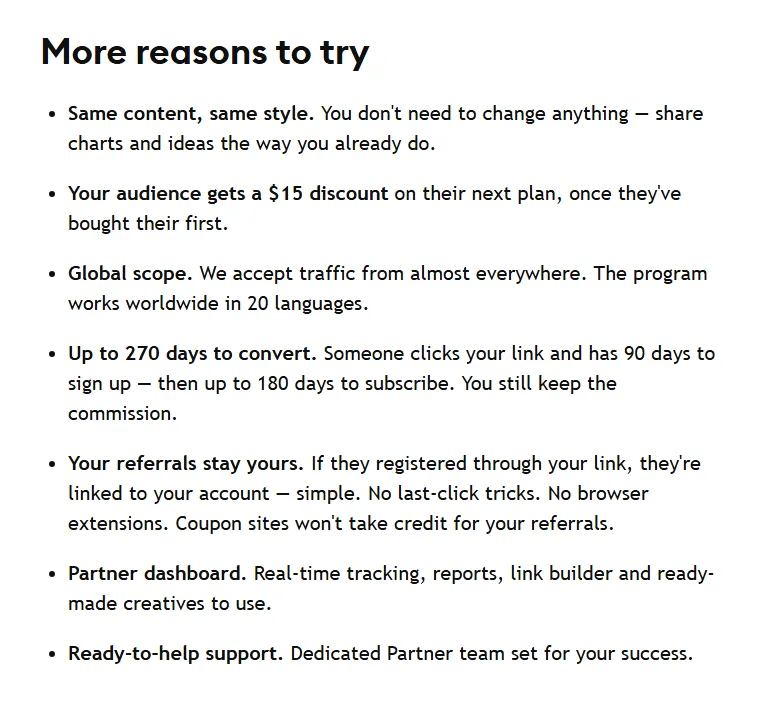
TradingView plans and prices in 2026
| Plan | Monthly | Annual (per month) | Saving | Charts per tab | Indicators per chart | Alerts |
|---|---|---|---|---|---|---|
| Basic (free) | 0 | 0 | – | 1 | 2 | 3 price alerts, with ads |
| Essential | 14.95 USD | 12.95 USD | 13% | 2 | 5 | 20 |
| Plus | 34.95 USD | 29.95 USD | 14% | 4 | 10 | 100 |
| Premium | 69.95 USD | 59.95 USD | 14% | 8 | 25 | 400 |
| Ultimate | 239.95 USD | 199.95 USD | 17% | 16 | 50 | 1,000 |
TradingView’s published USD prices, read 23 September 2026 (the Swiss page shows the same figures in CHF); annual figures are the yearly price divided by twelve. All paid plans remove ads and add volume profile; second-based intervals start at Premium.
Essential removes ads and allows two charts per tab and five indicators per chart, which covers a single-instrument workflow. Plus is the step up for watching several markets at once. Premium’s eight charts, second-based intervals and 400 alerts are built for active intraday trading; Ultimate, at 199.95 USD a month billed annually, is the plan TradingView offers to professional users. The Expert tier is no longer listed on the public pricing page. The plan-by-plan choice is on which TradingView plan to choose; the exact saving per plan and the month from which annual billing pays off are on yearly vs monthly billing.
TradingView promo code not showing at checkout: what is actually going on
A TradingView promo code is not showing because there is no field for one: TradingView sells no coupon codes, and its order page has no coupon box. The first checkout after signing up through our partner link shows the list price (Essential 14.95 USD monthly or 12.95 USD a month annually), and that is correct. The partner benefit, 15 USD off the next plan, is applied after the first paid purchase, not to it. The trial (30 days on Essential, Plus and Premium, 14 on Ultimate) is started from the pricing page and needs no code either.
| What you expected | What TradingView actually does |
|---|---|
| A code box at checkout | None exists |
| A discount on the first payment | List price; the plan prices are in the table above |
| 15 USD off now | 15 USD off the next plan, after the first paid plan |
| A code that unlocks the trial | Trial started from the pricing page; 30 days, 14 on Ultimate |
| Cash back | None; the 15 USD is applied to a plan purchase |
USD list prices from TradingView’s pricing page and partner terms from the partner programme page, read 22 September 2026. Two other things change the checkout figure without any promotion failing: sales tax, added depending on location, and the Monthly/Annually toggle (annual is 13 to 17 percent cheaper).
Reasons the TradingView partner discount does not apply later
- The account existed before the link was clicked TradingView links a user to a partner at registration; an earlier account cannot be attached afterwards, and there is no code to enter later.
- The time windows ran out After clicking, a visitor has 90 days to register and then 90 days to subscribe; a trial extends the window by another 90 days once it ends.
- The first plan was bought inside the iOS or Android app A caution rather than a certainty: TradingView’s refer-a-friend terms exclude app purchases, and app-store billing runs through Apple or Google. Buy the first plan on tradingview.com.
- It is still the first payment The discount is on the next plan; a first purchase is at list price.
- The purchase was market data or an add-on The partner page counts plans only; market data and other add-ons are not included.
TradingView money-back guarantee: the real refund rules (14 days on annual plans)
TradingView has no 30-day money-back guarantee. An annual subscription is refundable if requested within 14 calendar days of payment; on that, TradingView’s pages agree. On monthly plans TradingView contradicts itself: section 13 of its policies page allows a refund on a monthly subscription requested within 7 calendar days of payment, while the FAQ on its pricing page says refunds are for annual plans only, with none for monthly plans, upgrades or market data. Only the 14 days on annual plans are stated consistently. Refunds are requested through TradingView’s support team; there is no refund button in the account.
| Purchase | Refund window | Condition |
|---|---|---|
| Annual plan (Essential, Plus, Premium, Ultimate) | 14 calendar days after payment | Request through support |
| Monthly plan | Disputed: 7 calendar days under the policies page; none under the pricing-page FAQ | Ask support within the 7 days and quote section 13; a refusal is possible |
| Upgrade to a more expensive plan | None | Even if cancelled the same day, per the pricing FAQ |
| Monthly market data subscription | None | Stated as non-refundable |
| Annual market data subscription | 14 calendar days | The current month’s cost is deducted from the refund |
| Purchase inside the iOS or Android app | Apple or Google policy | Referred to App Store and Google Play rules |
| After a chargeback, dispute or claim | None | Filing one removes refund eligibility |
Compiled from TradingView’s policies page (sections 13, 14 and 15) and the pricing page FAQ, both read 23 September 2026. Paid Spaces (7 days) and AI Features subscriptions (14 days, by usage allowance) have their own windows.
How to request a TradingView refund
- Check the payment date against the window 14 calendar days for an annual plan, counted from the payment date. On a monthly plan, ask within 7 days and cite section 13 of the policies; the pricing FAQ says monthly plans are not refunded, so do not count on it.
- Contact TradingView’s support team Name the plan and the payment date.
- Cancel the subscription in Settings so it does not renew Cancellation is done in the billing section of Settings; a cancelled paid plan stays active until the next due date, a cancelled trial stops immediately.
- Do not file a chargeback with your bank or card issuer Users who have filed a chargeback, dispute or claim are not eligible for a refund; wait for support’s reply instead.
- App purchases: go to Apple or Google For a plan bought in the iOS or Android app, a refund is only possible under the App Store or Google Play policy; TradingView support cannot issue it. The renewal is also cancelled in the store, at least 24 hours before the trial or payment date.
Cancelling is not refunding. Cancelling stops the renewal; it does not return money: a subscription cancelled before the paid period ends remains active until the next due date, and on an annual plan the remaining months are used, not refunded, once day 14 has passed. If an annual plan’s automatic renewal fails, TradingView switches the account to monthly rather than ending it. An annual upgrade converts the remaining days into value on the new tier, which is why upgrades carry no refund of their own. The windows are short because the free trial is meant to be the evaluation period; it can be used once and converts to paid unless cancelled.
TradingView compared with other charting platforms
| Platform | Free plan | Free trial | Entry paid plan | Indicators on entry plan |
|---|---|---|---|---|
| TradingView | Yes: 1 chart per tab, 2 indicators | 30 days (14 for Ultimate) | 12.95 USD/mo annual | 5 |
| StockCharts | Yes: 3 indicators + 3 overlays per chart | 1 month, from the Extra level | Higher than Essential | 25 + 25 overlays |
| TrendSpider | No free plan | None free; the 14-day trial is paid | Standard: 59 to 89 USD a month after the paid trial, from 54 USD when subscribing directly | Automated analysis tools |
| thinkorswim | Free with a Schwab account | 30-day Guest Pass without an account; paperMoney for simulated trading | Free | Hundreds of indicators and studies |
Each platform’s own pricing or platform page, read 23 September 2026. Full comparisons: TradingView vs StockCharts, TradingView vs TrendSpider, TradingView vs thinkorswim.
TradingView’s advantage is breadth: one platform for stocks, crypto, forex and futures, a free plan without a time limit, and broker integration for order execution – including trading on Bybit directly from TradingView charts. Its weakness is that the free plan is deliberately thin, which is what the 30-day trial is for.
Related guides
TradingView promo code: common questions
Is there a TradingView promo code in 2026?
How does the 15 USD partner discount work, and why is my first payment full price?
Can I add the partner discount to an existing TradingView account?
Is the TradingView free trial really free, and what if I forget to cancel?
Does TradingView have a 30-day money-back guarantee?
Can I refund a monthly TradingView plan?
Is TradingView free?
Which TradingView plan should I choose?
Can I place trades inside TradingView, and with which brokers?
Does TradingView have mobile apps, and does buying in the app count?
Sources
- TradingView partner programme, captured 22 September 2026 (screenshot above) and re-read 23 September 2026: 15 USD discount on the next plan after the first purchase, tracking windows and qualifying purchases (plans only, not market data or add-ons).
- TradingView refer-a-friend programme, checked 21 August and 21 September 2026 (15 USD credit toward any subscription for the inviter), and the referral terms in TradingView’s policies (website purchases only, rewards cancelled on refund).
- TradingView pricing page, read 22 September 2026 and re-read 23 September 2026: monthly and annual prices, plan limits, trial lengths, broker trading on every plan, the sales tax note and the FAQ entries on cancellation, upgrades and refunds (annual plans only; none for monthly plans).
- TradingView policies, section 13 (automatic charge when a trial ends, billing, cancellation, refund windows of 14 calendar days on annual and 7 on monthly subscriptions, the latter contradicted by the pricing FAQ, which excludes monthly plans, market data, chargebacks) and sections 14 and 15 (App Store and Android subscriptions), read 23 September 2026.
- TradingView Help Center, How to trade on TradingView, and the brokers page (broker list), both read 23 September 2026.
- StockCharts pricing, TrendSpider pricing and Schwab thinkorswim, all read 23 September 2026.